Working from home has become the new normal for millions of people, and whether you work from home full-time or just a few days per week, having a proper home office setup makes an enormous difference in productivity, comfort, and professional appearance during video calls. The good news is that you don’t need to spend thousands of dollars to create an effective, professional home office. You can assemble a high-quality setup with all the essentials for under $250, and many items cost significantly less. Here are the ten must-have home office items that freelancers and remote workers should own—all available for under $50, many for under $20.
#1. Laptop Stand
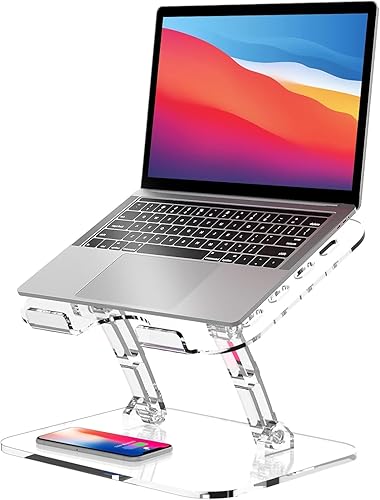
⭐ Product Pick: Lpoake Adjustable Foldable Laptop Stand
Ergonomic laptop elevation — ~$15-25 on Amazon Check price on Amazon →
Pros:
✅ Adjustable height and angle for ergonomic posture
✅ Folds flat for portability
✅ Compatible with 10-15.6 inch laptops
Cons:
❌ Lightweight build may wobble with heavy typing
❌ No built-in fan for cooling
Working with your laptop at desk height causes neck strain and poor posture. A laptop stand elevates your screen to eye level, forcing you to maintain proper posture and dramatically reducing neck and shoulder pain. When your monitor is at the right height, you work more comfortably, more productively, and with less physical strain. For someone spending 8 hours a day at their desk, a $20 laptop stand is one of the most valuable purchases you can make for your long-term health and comfort.
Laptop stands come in various styles: adjustable aluminum models that support different screen sizes, simple tilted stands, or modern designs that double as desk space underneath. Most are designed to pair with an external keyboard and mouse—when your laptop is elevated on a stand, you’ll want to type on a separate keyboard instead of reaching down to your keyboard, which would defeat the ergonomic benefit. A stand combined with a separate keyboard is the beginning of a truly professional, ergonomic workspace.
The health benefits alone justify the purchase. Chronic neck pain, tension headaches, and shoulder problems are common among people who work from home with improper setup. A laptop stand plus an external keyboard costs under $50 total and prevents years of pain and physical problems. It also makes your home office look more professional if you take video calls. The improvement is immediate and cumulative.
#2. Ergonomic Mouse
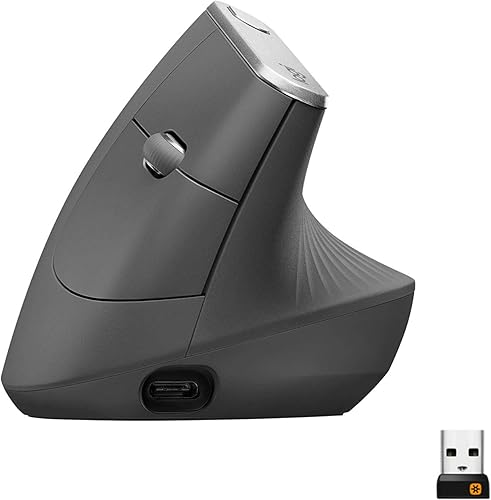
⭐ Product Pick: Logitech MX Vertical Wireless Ergonomic Mouse
Comfortable wrist positioning — ~$20-35 on Amazon Check price on Amazon →
Pros:
✅ 57-degree vertical angle reduces wrist strain
✅ Connects to 3 devices simultaneously
✅ Rechargeable battery lasts up to 4 months
Cons:
❌ Premium price point around $100
❌ Takes a few days to adjust to vertical grip
A standard mouse forces your wrist into an unnatural position for hours every day, leading to repetitive strain injury, carpal tunnel syndrome, and wrist pain. An ergonomic mouse keeps your wrist in a neutral position, significantly reducing strain and preventing injury. If you type and click for 8+ hours daily, this $25 investment prevents serious, chronic wrist problems. People who suffer from wrist pain quickly realize that an ergonomic mouse isn’t a luxury—it’s a necessity.
Ergonomic mice come in various designs: vertical mice that position your hand like shaking someone’s hand, contoured mice that cradle your palm, and mice with thumb rests. The key is finding one that feels comfortable for your hand size and grip style. Many people are shocked at how much more comfortable a properly designed mouse feels. The improvement in wrist comfort is noticeable immediately, and the long-term health benefits are significant.
Pair an ergonomic mouse with an external keyboard and laptop stand to create a fully ergonomic setup that promotes health and comfort. Most quality ergonomic mice are wireless, so cables don’t clutter your desk. They’re durable and last for years. For someone who works from home, an ergonomic mouse is as important as a comfortable chair—it’s an investment in your physical health and your ability to work pain-free.
#3. Desk Organizer

⭐ Product Pick: Amazon Basics Mesh Desk Organizer with Drawer
Keep your workspace neat and organized — ~$10-20 on Amazon Check price on Amazon →
Pros:
✅ Pull-out drawer for small supplies
✅ Sturdy metal mesh construction
✅ Compact footprint fits any desk
Cons:
❌ Only available in black
❌ Drawer slides can be stiff at first
A cluttered desk is distracting and makes it harder to find things. A desk organizer—whether it’s a multi-drawer unit, a shelf organizer, or a desktop filing system—keeps your workspace tidy and everything within reach. Studies show that organized workspaces lead to increased productivity and focus. When you’re not spending mental energy on a messy environment, you have more mental energy for work. A desk organizer is a simple way to boost both productivity and the professional appearance of your home office.
Look for organizers with compartments for pens, paper, sticky notes, cables, and other items you regularly use. Many desktop organizers are made from bamboo or wood and look attractive on camera if you take video calls. They’re available in various sizes to fit different desk configurations. The investment is minimal—under $20—and the return in terms of productivity and workspace aesthetics is immediate and ongoing.
Beyond just looking good, an organized desk helps you work more efficiently. You know exactly where everything is, so you don’t waste time searching for supplies. Important papers are organized and easy to find. Your workspace feels calm and focused instead of chaotic. It’s amazing how much a $15 desk organizer improves your daily work experience and professional image during video calls.
#4. Ring Light

⭐ Product Pick: Logitech Litra Glow Premium LED Streaming Light
Professional lighting for video calls — ~$20-40 on Amazon Check price on Amazon →
Pros:
✅ TrueSoft technology mimics natural light
✅ Adjustable color temperature and brightness
✅ Mounts directly on monitor or tripod
Cons:
❌ Higher price than basic ring lights
❌ USB-C power required, no battery option
When you’re on video calls, you want to look your best. Poor lighting makes you look tired, pale, and unprofessional. A ring light—a circular light that mounts near your webcam—provides soft, flattering light that illuminates your face evenly. The light is bright enough to overcome poor room lighting and creates a professional appearance that gives you confidence during client calls and presentations. The camera pickup is noticeably better, making you appear more polished and professional.
Ring lights are affordable—under $40—and they make a dramatic difference in how you appear on camera. Many include adjustable brightness and color temperature, so you can dial in the exact lighting you prefer. They’re compact and can be positioned easily. If you take regular video calls, a ring light is one of the best investments you can make for your professional image.
The psychological impact is significant too. When you look good on camera, you feel more confident and professional. Clients and colleagues see you in the best light and form better impressions. A ring light costs under $40 and can influence how people perceive your professionalism and competence. It’s also useful if you create any video content—tutorials, social media videos, or presentations—making your content look polished and professional.
#5. Noise-Canceling Earbuds
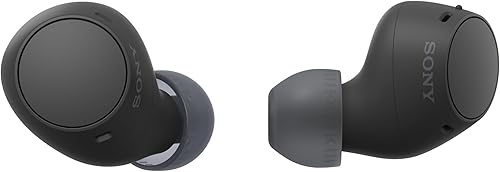
⭐ Product Pick: Sony WF-C510 Truly Wireless Bluetooth Earbuds
Block distracting background noise — ~$30-50 on Amazon Check price on Amazon →
Pros:
✅ Up to 22-hour total battery life with case
✅ Lightweight and comfortable for all-day wear
✅ Multipoint connection for switching devices
Cons:
❌ No active noise cancellation on this model
❌ Bass can be light without EQ adjustments
If you work in a home with other people, pets, traffic noise, or other distractions, noise-canceling earbuds are essential. They allow you to focus completely on your work, eliminate distracting background sounds, and improve your audio experience during calls. Colleagues will hear you clearly instead of background noise. For someone working in a chaotic home environment, noise-canceling earbuds are often the difference between being able to focus and being perpetually distracted.
Modern noise-canceling earbuds are surprisingly affordable—quality models with active noise cancellation cost $30-50. They work by emitting sound waves that cancel out external noise, creating a zone of quiet around you. Many models also have transparency mode where you can hear surroundings when needed. The battery life is typically 6-8 hours per charge plus additional hours from the charging case. They’re small, portable, and available with built-in microphones perfect for calls.
The productivity boost is substantial. Studies show that noise reduces productivity and increases stress. Noise-canceling earbuds solve this problem instantly. You can work in noisy environments and maintain complete focus. They’re also useful for commuting to coffee shops or coworking spaces if you don’t work from home full-time. They help you stay in a focused, productive mental state regardless of your environment.
#6. Blue Light Glasses
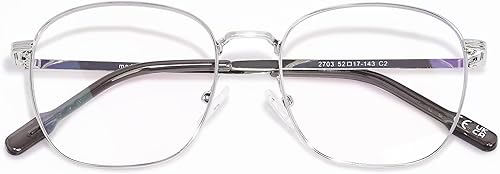
⭐ Product Pick: OPTOFENDY Metal Blue Light Blocking Glasses
Reduce eye strain from screen time — ~$15-30 on Amazon Check price on Amazon →
Pros:
✅ Reduces eye strain from prolonged screen use
✅ Stylish metal frame for professional look
✅ Lightweight and comfortable all day
Cons:
❌ Slight yellow tint may affect color perception
❌ Non-prescription only
Screen time causes eye strain, fatigue, and can interfere with sleep. Blue light glasses have lenses coated to filter blue light from screens, reducing strain and making it more comfortable to look at your computer for hours. If you work from home and spend 8+ hours looking at screens, blue light glasses are worth trying—many people report noticeably reduced eye fatigue, fewer headaches, and better sleep quality when wearing them. They’re affordable and worth the experiment.
Quality blue light glasses cost $15-30 and are available in many styles. You’ll wear them whenever you’re working, so choosing a style you like is important. The effectiveness varies from person to person, but for many remote workers, the reduction in eye strain and screen fatigue is significant. If you experience headaches after long workdays or have difficulty sleeping, blue light glasses are worth trying.
The combination of blue light glasses with good screen positioning and adequate lighting creates an ergonomic visual workspace. Many people use them throughout their workday and find they work better than relying on blue light filter software. They’re a non-pharmaceutical way to reduce eyestrain and the associated headaches that many remote workers experience. For under $30, it’s worth experimenting to see if they help you work more comfortably.
#7. USB Hub
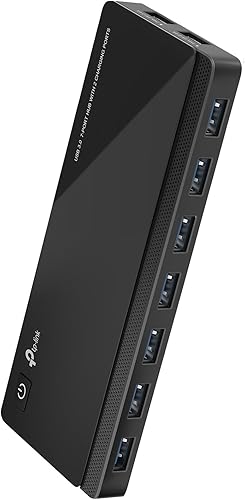
⭐ Product Pick: TP-Link Powered USB 3.0 Hub with 7 Ports
Expand your connectivity options — ~$15-30 on Amazon Check price on Amazon →
Pros:
✅ 7 USB 3.0 data ports plus 2 charging ports
✅ External power supply prevents port drops
✅ Works with Windows, Mac, and Chrome OS
Cons:
❌ Bulky with external power adapter
❌ No USB-C ports
Modern laptops have limited USB ports, but you need to connect multiple devices: mouse, external drive, printer, etc. A multi-port USB hub expands your connectivity and lets you connect all your devices without constantly plugging and unplugging things. A powered USB hub also provides power to charge devices, reducing the number of wall chargers taking up outlet space. For under $25, a USB hub eliminates the frustration of limited ports and keeps your workspace organized and efficient.
Look for a hub with at least 4 USB ports and preferably some USB-C ports to future-proof your setup. Many hubs also include SD card readers, which is helpful if you work with photos or videos. The built-in power means devices charge faster than through passive USB ports. A good USB hub lasts for years and becomes indispensable for organizing your workspace and eliminating cable clutter.
The time savings from not constantly plugging and unplugging devices is surprisingly valuable. Everything you need is always connected and ready to use. It’s a simple tool that makes your workspace more efficient and professional. If your laptop has limited ports, a USB hub is essential.
#8. Desk Pad
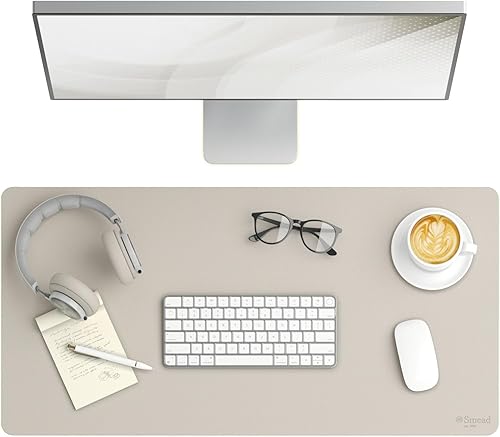
⭐ Product Pick: Smead Vegan Leather Desk Pad 31.5 Inch
Large mouse pad and desk protection — ~$15-25 on Amazon Check price on Amazon →
Pros:
✅ Smooth writing surface doubles as mouse pad
✅ Non-slip suede backing stays in place
✅ Water-resistant and easy to clean
Cons:
❌ May show scratches over time
❌ Edges can curl if not laid flat initially
A large desk pad serves multiple purposes: it protects your desk surface from scratches and stains, provides a smooth surface for your mouse to glide, defines your workspace visually, and adds a professional look to your home office. Quality desk pads are made from durable materials that withstand years of use and multiple cleanings. They come in various sizes and colors to match your desk and style. For under $20, a desk pad improves both the appearance and functionality of your workspace.
A good desk pad is thick enough to protect your desk but smooth enough for precise mouse movement. Some desk pads have edge stitching to prevent fraying and maintain their shape. They’re easy to clean—just wipe with a damp cloth. If you take video calls, a nice desk pad adds polish to the background. It’s one of those small touches that elevates your entire workspace from “home office” to “professional office.”
Beyond aesthetics, a desk pad is protective—your desk accumulates scratches, coffee stains, and other damage over time. A pad prevents this, keeping your desk looking nice. If you ever want to sell your desk or move, having protected surfaces is valuable. It’s a small investment that protects a much larger investment and improves both function and appearance.
#9. Cable Management Clips

⭐ Product Pick: 3M Command Large Cord Clips (2-Pack)
Organize and hide cables — ~$5-12 for a set on Amazon Check price on Amazon →
Pros:
✅ Damage-free adhesive removes cleanly
✅ Holds multiple cables per clip
✅ Trusted 3M Command brand quality
Cons:
❌ Only 2 clips per pack
❌ May not hold very thick cables
A home office with cables running everywhere looks messy and unprofessional, especially if you take video calls. Cable management clips hold cables neatly along the desk edge or wall, keeping them organized and out of sight. For just $10, a set of clips transforms a chaotic cable situation into a neat, organized workspace. They’re simple—just clips that hold cables in place—but they make a huge difference in the appearance and organization of your desk.
Cable clips come in various materials and designs: plastic clips that stick to desk surfaces, adhesive clips that mount to walls, and metal clips that screw into place. Most are designed to hold multiple cables without pinching them. They’re durable and last for years. Installing them takes just a few minutes and instantly makes your workspace look more professional and organized.
Beyond appearance, organized cables are safer and easier to access if you need to unplug something. You can quickly identify which cable is which without tracing tangled wires. Everything has its place, making your workspace feel calm and organized. For a $10 investment, cable management clips are a worthwhile improvement to any home office setup.
#10. Portable Monitor Stand

⭐ Product Pick: ASUS ZenScreen Stand MTS02D
Elevate portable monitors or tablets — ~$15-30 on Amazon Check price on Amazon →
Pros:
✅ Tilt, pivot, and height adjustments
✅ Designed for portable monitors
✅ Quarter-inch tripod socket for versatility
Cons:
❌ Only fits ASUS ZenScreen models natively
❌ Stand only, monitor sold separately
If you have a portable monitor or tablet that you use for secondary display space, a stand keeps it at the right angle and position for comfortable viewing. Many people add a portable second monitor to their laptop setup for increased productivity—reference materials, email, or secondary applications on one screen while you work on the other. A stand ensures your secondary display is at the right height and angle, preventing neck strain.
Portable monitor stands are lightweight and adjustable, allowing you to position your secondary screen exactly where you want it. They’re also useful if you want to prop up your phone to watch reference videos while you work. Many stands are designed to fold up compactly, making them portable if you work from different locations. For under $20, a stand transforms a portable monitor from a awkwardly positioned device into a properly positioned work tool.
A secondary display is proven to increase productivity—you can reference information without switching between windows on your primary screen. A stand ensures it’s positioned ergonomically so you work comfortably. Combined with a proper laptop stand and external keyboard, a portable monitor and stand create a dual-screen workspace that rivals any professional office setup.
Final Thoughts
A professional, comfortable, and productive home office doesn’t require a huge budget. These ten items cost between $150-250 total and create a workspace that supports long-term productivity, comfort, and professional appearance. The health benefits of proper ergonomics (laptop stand, external keyboard, ergonomic mouse) are substantial—preventing repetitive strain injuries and chronic pain is worth far more than the minimal cost. The productivity benefits of organization, good lighting, and noise reduction mean you’ll get more done in less time, easily recouping your investment. Whether you’re a full-time remote worker or freelancer, or you just need a workspace for occasional home office days, investing in proper equipment pays for itself through increased productivity and reduced health issues. Start with the items that address your biggest pain points—if you have neck pain, prioritize the laptop stand and external keyboard; if you take frequent video calls, prioritize the ring light and noise-canceling earbuds—and build from there. Your future self will thank you for investing in a workspace that supports your health and productivity.
This article contains affiliate links to Amazon. As an Amazon Associate, we earn from qualifying purchases at no extra cost to you.
Frequently Asked Questions
What are the best home office essentials on a budget?
Essential budget home office items include a monitor stand with storage, an ergonomic mouse pad, an LED desk lamp with USB charging, and a laptop stand. These items improve posture and productivity for under $30 each.
How do I set up a productive home office cheaply?
Start with a monitor riser for better ergonomics, add a desk organizer for supplies, get an LED desk lamp for eye comfort, and use cable management trays to reduce clutter. Total setup under $150.
What home office accessories improve productivity?
Noise-cancelling earbuds eliminate distractions, a whiteboard helps track tasks, a footrest improves posture during long sessions, and a USB hub keeps all devices connected. Small investments with big productivity gains.
Related Money-Saving Guides
Top 10 Smart Home Devices
Top 10 Energy-Saving Devices
Top 10 Organization Products